Blog · 8 min read
ADA Website Lawsuit: 7–14 Day Response for U.S. Businesses

An ADA website lawsuit claims your site’s code creates barriers that block people with disabilities from using it, most often through inaccessible forms, checkout flows, or images without text alternatives. If you’ve received a demand letter or complaint, the single most important move is to preserve evidence and start an accessibility audit immediately, ideally with counsel involved from day one. The Department of Justice and the WCAG standard define what “accessible” means, and a tool like AccessWiser can generate the dated proof your defense will need.
TL;DR:
Most website lawsuits target common, fixable issues like missing alt text, inaccessible forms, or non-captioned videos, especially in e-commerce and healthcare sectors.
Responding quickly within 14 days by documenting current site code, running automated scans, and creating a remediation plan significantly improves settlement chances.
Ongoing accessibility programs that include regular audits, fixes, monitoring, and documentation are essential to prevent reintroduction of barriers over time.
Accessibility overlay widgets do not replace foundational code fixes and have not reduced lawsuit frequency, making proper coding the priority.
Presenting dated evidence, specific scan reports, and a clear fix timeline strengthens most legal negotiations and attempts to avoid liability.
Table of Contents
What Law and Standards Apply to Your Website
The Americans with Disabilities Act splits into two relevant paths, and knowing which one applies to you shapes everything else. Title II covers state and local government entities. Title III covers private businesses, including nearly every commercial website that qualifies as a “place of public accommodation.” The DOJ has held for years that the ADA applies to web content, even though Title III itself never mentions websites explicitly. That gap is exactly what fuels so much litigation uncertainty for private companies.
There’s no formal Title III regulation spelling out a technical standard, but courts and plaintiff’s attorneys don’t operate in a vacuum. They lean heavily on the Web Content Accessibility Guidelines published by the W3C, specifically WCAG 2.1 and 2.2 at the AA conformance level. That’s the same benchmark that the DOJ formally adopted for public entities.
For state and local governments, the rule is concrete:
-
Large entities (population 50,000 or more) must comply within about three years after the rule’s publication.
-
Smaller entities have a shorter additional period to comply within a few years as stipulated by the rule.
-
The Federal Register notes limited exceptions for archived content and certain third-party materials.
Private businesses aren’t bound by those dates, but treating WCAG 2.2 AA as your working standard is the closest thing to a safe harbor available today.
Why Plaintiffs File and Who Gets Targeted
Most claims trace back to a handful of recurring failures: screen readers that can’t parse a checkout form, images missing alt text, videos without captions, and keyboard navigation that dead-ends on a menu. These aren’t exotic bugs. They’re common, fixable problems that show up on sites built without accessibility in mind from the start.
Certain sectors draw outsized attention:
-
E-commerce sites, because checkout is a high-stakes, high-friction flow plaintiffs can point to directly.
-
Restaurants and food delivery platforms, where online ordering has exploded and accessibility hasn’t kept pace.
-
Higher education and healthcare portals, where public-facing services intersect with legal exposure.
Filing volume backs this up. Federal court saw 3,117 website accessibility lawsuits in 2025, a 27% jump from the prior year, and litigation trackers describe a historic high through mid-2026, with hotspots concentrated in New York, Florida, and Illinois. A small number of repeat-filer firms account for a disproportionate share of these cases, often sending demand letters in batches after running the same automated scans across hundreds of sites.
Your 7 to 14 Day Response Checklist
Once a demand letter or complaint lands on your desk, the clock matters. Here’s the order that protects you best.
-
Preserve everything. Save the letter, your site’s current code, server logs, and any correspondence. Don’t alter or delete anything that could look like evidence tampering.
-
Call ADA-experienced counsel before you respond to anyone. Public statements, even well-meaning ones, can undercut your legal position later.
-
Notify your internal team so developers and marketing aren’t making unrelated changes that muddy the record.
-
Run an automated scan against WCAG 2.2 AA immediately, paired with manual testing of your most critical journeys: checkout, account creation, contact forms.
-
Freeze nonessential site changes while your team documents the current state and plans fixes.
-
Draft a remediation plan with realistic timelines and budget, something you or your attorney can present to opposing counsel.
Pro Tip: Take dated screenshots and export scan reports the same day you receive a demand letter. A remediation effort that starts on day one and is fully documented carries far more weight in settlement talks than one that begins after weeks of internal debate.
Courts and opposing counsel respond differently to a business that shows it’s already fixing the problem versus one that goes silent. Documented remediation efforts can influence how enforcement plays out, and in some cases support an argument that the issue is already moot.
Building a Program That Keeps Barriers From Coming Back
A one-time fix doesn’t hold up over time. Sites change constantly, new pages, new plugins, new checkout steps, and each change can reintroduce barriers you already fixed. The businesses that stay out of court treat accessibility as an ongoing program, not a single sprint.
That program has four parts:
-
Audit with automated scanning plus manual testing, since automated tools catch a meaningful chunk of issues but miss things like logical reading order or meaningful alt text.
-
Fix critical user journeys first (checkout, forms, navigation), then move to systemic issues like color contrast or heading structure across the whole site.
-
Monitor with scheduled re-checks so a new landing page or plugin update doesn’t quietly break what you already fixed.
-
Document every scan, every fix, and keep a current accessibility statement that reflects real, verifiable effort.
Pro Tip: Treat every accessibility fix like a support ticket, with a date, an owner, and a resolution note. That paper trail is often the difference between a quick settlement and a drawn-out fight.
Accessibility Widgets: What They Do (and Don’t) Fix
Overlay widgets that promise instant compliance are tempting, but they don’t rewrite your underlying code. A widget can add contrast controls or resize text, yet it can’t fix a checkout button with no accessible label or a form field missing programmatic instructions, the exact barriers plaintiffs cite most.
The data backs this up: widgets have not reduced lawsuit volume, and many businesses that installed one still got sued. In some cases, poorly built overlays introduce new conflicts with screen readers, making things worse.
-
Widgets can serve as a helpful, visitor-facing convenience layer.
-
They should never substitute for permanent code-level fixes.
-
Courts and plaintiffs generally look past a widget straight to whether the code itself is accessible.
How the Scan-Fix-Monitor-Document Cycle Works in Practice
Turning that four-part roadmap into daily reality is where most businesses stall out, and it’s exactly where a purpose-built tool earns its place. AccessWiser scans your site against WCAG 2.2 AA success criteria, with mappings to Section 508 and EN 301 549, and ties every finding to the specific element and criterion it violates.
Instead of a vague “your site isn’t accessible” report, you get plain-language instructions for fixing the actual code, so the repair is permanent rather than a patch layered on top.
-
Scheduled re-checks catch regressions before a plaintiff’s attorney does.
-
Dated scan reports and generated accessibility statements give you the documented, good-faith evidence discussed earlier.
-
An optional visitor-facing widget is available for people who want adjustable contrast, reading aids, or motion reduction, but it’s paired with the code-level fixes, never offered as a replacement for them.
That combination, real remediation plus dated proof, is what turns “we tried” into something a court or opposing counsel can actually verify.
What We’ve Learned From Watching These Cases Unfold
The businesses that get burned worst aren’t the ones with the most complex sites. They’re the ones that ignore a demand letter, hoping it goes away, or that slap a widget on their homepage and call it done. Neither move fools a plaintiff’s attorney who’s filed hundreds of these cases and knows exactly what a superficial fix looks like.
What actually shifts outcomes is dated evidence and a realistic plan. A business that can show a scan report from three weeks ago, a list of fixes already shipped, and a timeline for what’s left is negotiating from strength. A business with nothing but a promise is negotiating from fear.
Prioritize the user journeys plaintiffs actually complain about, checkout, account creation, contact forms, before chasing every minor contrast issue on a blog page nobody visits. That’s not cutting corners. That’s matching your effort to where the legal and human stakes actually sit.
— The AccessWiser Team
Start Fixing What a Lawsuit Would Target
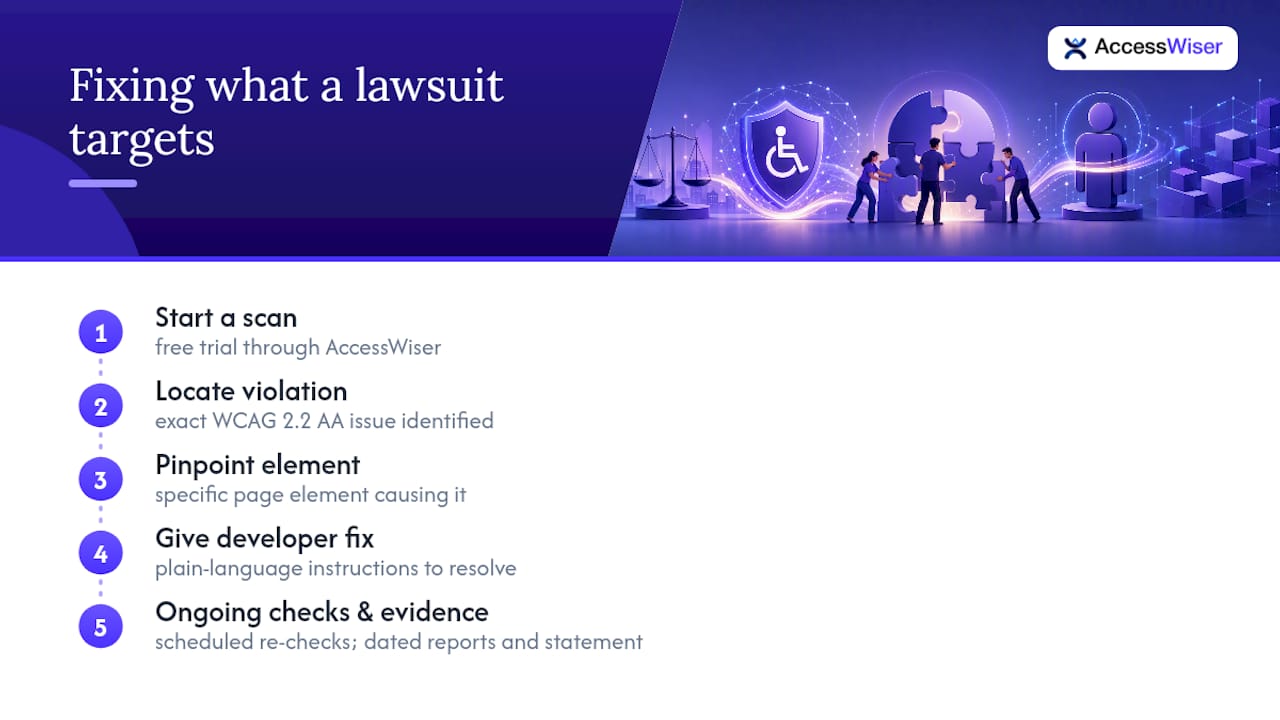
There are quick-fix shortcuts on the market, but a scan without permanent code guidance just tells you what’s wrong without helping you close the gap. AccessWiser is built around the opposite idea: find the exact WCAG 2.2 AA violation, tie it to the specific element causing it, and hand your developer plain-language instructions to fix it for good.
You can start with a free trial scan through AccessWiser’s solutions page and see exactly where your site stands today. From there, scheduled re-checks keep watching for regressions, and every scan generates the kind of dated report and accessibility statement that shows real, ongoing effort if you ever need to prove it. Head to AccessWiser to get your first scan running this week.
This article is general information, not a substitute for advice from a qualified lawyer. Consult a qualified legal professional about your own circumstances before acting on anything here.
Sources
Recommended
Articles on this blog are general information about web accessibility, not legal advice. Laws change and their application depends on your specific situation — for decisions with legal consequences, consult a qualified legal professional.
Articles on this blog are general information about web accessibility, not legal advice. Laws change and their application depends on your specific situation — for decisions with legal consequences, consult a qualified legal professional.