Blog · 11 min read
$125 per Page: Estimate Accessibility Audit Costs for Site Owners

Most accessibility audits from specialist vendors cost between $1,250 and $2,750, with manual audits for small-to-mid sites running $2,500 to $7,000 and enterprise VPAT engagements often reaching $20,000 or more. A quick heuristic: multiply your page count by roughly $125 for a rough estimate, but remember remediation typically costs more than the audit itself.
TL;DR:
Automated scans alone are inexpensive and provide quick issue detection but are insufficient for legal compliance without manual verification.
Hybrid audits, combining automation with manual sampling, typically cost between $1,250 and $2,750 and suit most small-to-mid businesses.
Full manual audits with extensive testing range from $2,500 to $7,000, while enterprise-level engagements can exceed $20,000 depending on complexity.
The most significant cost driver is the site’s template diversity and interactive components, not the total page count.
Remediation efforts usually cost one to three times the audit price and should be budgeted upfront to avoid surprises later.
Table of Contents
-
Automated vs. Hybrid vs. Manual: Which Audit Fits Your Budget?
-
How AccessWiser Thinks About Audit Cost and Ongoing Compliance
-
Get Documented Accessibility Coverage Without the Enterprise Price Tag
-
Where to Learn More About Accessibility Standards and Evaluation
How Much Does an Accessibility Audit Cost by Type?
The price you pay depends almost entirely on how much human review is included. Automated-only scans sit at the bottom of the market, hybrid audits occupy the middle, and full manual audits with legal-grade documentation sit at the top.
An automated scan alone typically costs very little, sometimes bundled into a monthly software subscription, and it delivers a code-level list of detectable issues within minutes. That’s useful for ongoing monitoring, but it isn’t a complete accessibility evaluation on its own, since automated tools only catch a portion of WCAG success criteria.
A hybrid audit, combining automated scanning with manual sampling of key templates, is where most small-to-medium businesses land. Accessible.org puts typical audits in the $1,250 to $2,750 range, with per-page rates of $100 to $250 for primary templates. This band buys you a prioritized issue list, WCAG references, and enough manual verification to catch what automation misses.
Full manual audits with screen reader testing, keyboard-only navigation checks, and detailed developer guidance for small-to-mid sites commonly run $2,500 to $7,000. Enterprise engagements that include a formal VPAT or ACR, multiple environments, and extensive documentation can climb past $20,000, sometimes reaching $50,000 or more depending on complexity.
| Audit type | Typical cost range | What you get |
|---|---|---|
| Automated-only scan | Low monthly subscription | Code-level issue detection, ongoing monitoring, no manual verification |
| Hybrid audit | $1,250–$2,750 | Automated scan plus manual sampling of key templates and WCAG references |
| Full manual audit (small-to-mid site) | $2,500–$7,000 | Screen reader and keyboard testing, detailed developer worklist |
| Enterprise audit with VPAT/ACR | $20,000–$50,000+ | Multi-environment testing, formal conformance report, extensive documentation |
An automated scan is enough when you need continuous monitoring between full audits, but it is not sufficient alone for compliance claims. Hybrid audits provide a balance of cost and coverage suitable for many businesses.
What Drives the Price of an Accessibility Evaluation?
Vendors don’t quote by page count alone. Several concrete factors move the number up or down, and understanding them helps you avoid surprises when quotes come back.
-
Unique templates and components: the biggest single driver. A 500-page site built on five templates is cheaper to audit than a 50-page site with 20 bespoke layouts, because auditors sample by template rather than counting every page.
-
Interactive components: forms, carousels, modals, and custom widgets each need separate manual testing since they behave differently for keyboard and screen reader users.
-
Environments tested: desktop web, mobile web, and native apps are often priced as separate line items, since each requires its own testing pass.
-
WCAG target level: auditing against WCAG 2.2 AA costs more than a baseline scan but less than an AAA-level review, which is rarely required outside specialized sectors.
-
VPAT/ACR requirements: a formal conformance report adds substantial hours because it requires documenting every success criterion individually.
-
Site health and technical debt: older codebases with inconsistent markup often widen the gap between what the audit finds and what remediation will cost later.
Pro Tip: Count your unique page templates before requesting quotes, not your total page count. That single number will get you a far more accurate estimate than guessing from your sitemap.
Automated vs. Hybrid vs. Manual: Which Audit Fits Your Budget?
Choosing the right audit type comes down to matching coverage to your actual risk. A local nonprofit site with low legal exposure has different needs than an e-commerce platform facing active demand letters.
-
Automated scans detect roughly 30 to 40 percent of WCAG success criteria, reliably catching missing alt text, color contrast failures, and missing form labels. They’re inexpensive and fast but never sufficient alone for legal defensibility.
-
Manual testing adds keyboard navigation checks, screen reader walkthroughs (typically with NVDA, JAWS, or VoiceOver), and focus-order review. This is where most of the subjective criteria, like meaningful reading order or logical tab sequence, get validated.
-
Hybrid audits blend both, and the approach is now standard practice. Applause’s 2026 State of Digital Quality report found 79% of organizations use automated tools while 89.3% still validate findings with human testers.
-
User testing with people with disabilities and formal VPAT documentation sit on top of a standard audit as optional add-ons, typically justified for e-commerce, healthcare, or government-adjacent sites facing higher legal scrutiny.
If your site handles transactions, patient data, or public services, budget for the hybrid tier at minimum. A blog or informational site with modest traffic can often start with automated monitoring and add manual review annually.
How Do Vendors Actually Calculate Your Quote?
Understanding the pricing model behind a quote helps you compare vendors fairly instead of just comparing bottom-line numbers.
-
Per-page or per-screen rates. Some vendors quote $100 to $250 per primary page, with $125 per page as a common fast-estimate multiplier for budgeting purposes.
-
Template-based sampling. Most experienced auditors price by unique template rather than raw page count, since testing five instances of the same layout adds little value once the pattern is verified.
-
Hourly or day-rates. Specialized work like screen reader testing, PDF remediation, or a verification pass after fixes ship is often billed hourly rather than folded into a flat audit fee.
-
Scoped packages with add-ons. Mobile app testing, PDF document review, VPAT creation, and user testing with people with disabilities are typically quoted as separate line items on top of the base audit.
Ask for the breakdown behind any flat quote. A vendor who can’t explain whether they’re charging per page, per template, or per hour hasn’t scoped your project carefully.
Why Remediation Costs More Than the Audit Itself
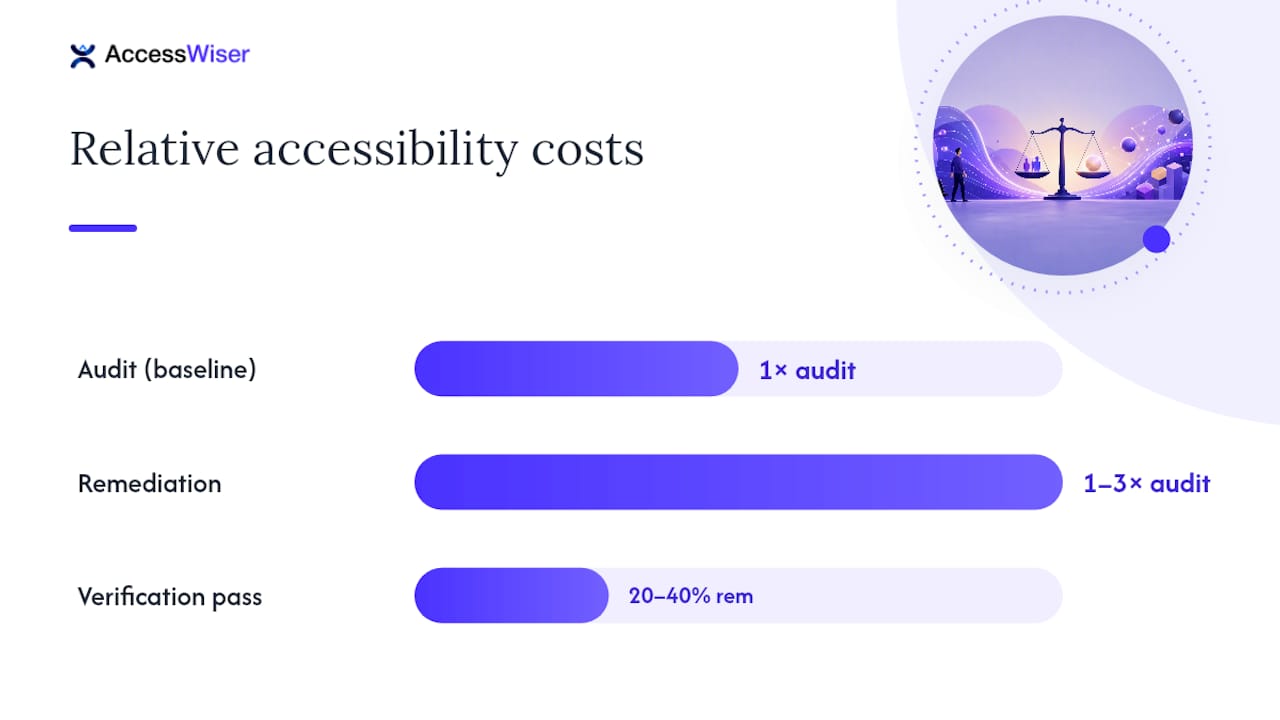
The audit is only step one. Fixing what it finds is usually the larger line item in your budget, and businesses that skip this planning step end up blindsided.
A practical heuristic: budget remediation at roughly 1 to 3 times the audit cost, adjusting upward if the report reveals structural issues like inaccessible navigation patterns or a component library that needs rebuilding from scratch rather than patched.
Applause’s 2026 research notes that enterprises commonly add a 20 to 40 percent premium for a verification pass after remediation, confirming fixes actually resolved the flagged issues without introducing new ones.
-
Verification/validation pass: confirms fixes work and typically adds 20 to 40 percent on top of remediation cost.
-
Ongoing monitoring subscriptions: catch regressions between full audits, usually priced far below a one-time manual audit.
-
Why cheap audits backfire: an audit that only lists problems without clear developer guidance often costs more in the long run, since your team has to reverse-engineer the fix.
Skipping remediation budgeting is the single most common mistake website owners make when planning accessibility work.
How to Get an Accurate Quote (and Spot a Bad One)
Comparable quotes require comparable requests. Vague scope invites vague pricing, and vague pricing invites scope creep once work begins.
-
Specify your WCAG target level (2.2 AA is standard for most legal frameworks).
-
List every environment you need tested: desktop, mobile web, native apps.
-
Identify your unique templates and key user flows (checkout, account creation, contact forms).
-
Request the deliverable format upfront: a developer worklist, a formal report, or both.
-
Ask whether a VPAT or ACR is included or priced separately.
-
Request a sample report or worklist from a past engagement before signing.
Pro Tip: Ask every vendor for hours allocated per template and per assistive-technology test. If they can’t itemize it, they likely haven’t scoped your site carefully.
Watch for red flags: a vendor calling an automated-only scan a full “audit,” remediation guidance that’s vague (“improve contrast” with no specific values), or no verification pass offered after fixes ship. The W3C’s evaluation report template is a useful benchmark, since it specifies exactly what a credible report should include: WCAG version tested, tools used, dates, and manual review steps.
What to Expect After the Audit Wraps Up
Timelines vary sharply by audit type. Automated scans return results within days. Hybrid audits typically take one to three weeks depending on site size. Full manual audits with extensive documentation can run two to six weeks for larger, more complex sites.
Your deliverables should include:
-
A prioritized developer worklist tying each issue to a specific element and WCAG success criterion.
-
Direct links to the failing code or page, not just a general description.
-
A VPAT or ACR if you requested one, following the W3C’s recommended report structure.
-
A clear remediation timeline and a scheduled re-check to confirm fixes stuck.
Most businesses benefit from quarterly automated re-checks between full manual audits, especially after a site redesign or a major content push, since new templates and components reintroduce the same issues you just paid to fix.
How AccessWiser Thinks About Audit Cost and Ongoing Compliance
A one-time audit gives you a snapshot. Sites change constantly, and every new page or component can reintroduce issues you already paid to fix. That’s why AccessWiser pairs automated scanning against WCAG 2.2 AA, with Section 508 and EN 301 549 mappings, with scheduled re-checks that catch regressions before they pile up.
Each finding can include plain-language guidance tied to the specific element and criterion involved, helping ensure fixes happen in the actual code rather than through a runtime patch. A SaaS-led approach can provide documented, dated evidence of scans and fixes, rather than just a static report that ages the moment new code is shipped.
Get Documented Accessibility Coverage Without the Enterprise Price Tag
Traditional audit vendors quote you once, hand over a PDF, and disappear until you call them back next year. That gap is exactly where regressions creep in and where a business’s accessibility posture quietly erodes between engagements. AccessWiser closes that gap by combining ongoing automated scanning, scheduled re-checks, and dated documentation into a single subscription, so you’re never paying enterprise VPAT rates just to find out whether last month’s redesign broke your checkout flow.
Explore AccessWiser’s accessibility solutions to see how scanning, remediation guidance, and monitoring fit together, or start a free trial to run a sample scan on your own site and see exactly what a code-level worklist looks like before you commit to anything.
Where to Learn More About Accessibility Standards and Evaluation
-
WCAG evaluation resources — W3C/WAI
-
Accessibility evaluation report template — W3C/WAI
An Editorial Take on What Cheap Audits Actually Cost You
The accessibility audit market has a pricing problem that nobody talks about directly: the cheapest quote is rarely the cheapest outcome.
What gets underestimated most isn’t the audit fee. It’s remediation. Businesses budget for the audit, get the worklist, and then discover fixing a component library riddled with technical debt costs three times what the audit did. That’s not a vendor overcharging you. That’s the real cost of deferred maintenance finally showing up on an invoice.
The smarter move is treating accessibility as a recurring line item, not a one-time purchase. A single audit is a snapshot of a site that will look different in six months once your team ships a new checkout flow or redesigns the homepage. Pairing an initial hybrid or manual audit with continuous automated monitoring costs less over three years than repeating a full manual audit annually, and it catches regressions while they’re still cheap to fix rather than after they’ve compounded across a dozen new pages.
— The AccessWiser Team
Sources
-
State of Digital Quality 2026 — Accessibility report — Applause
-
Website Accessibility Audit Cost: 2026 Pricing Guide — eSEOspace
Recommended
Articles on this blog are general information about web accessibility, not legal advice. Laws change and their application depends on your specific situation — for decisions with legal consequences, consult a qualified legal professional.
Articles on this blog are general information about web accessibility, not legal advice. Laws change and their application depends on your specific situation — for decisions with legal consequences, consult a qualified legal professional.