Blog · 12 min read
4 Steps to Defensible ADA Compliance for Website Owners: ADA vs WCAG

The ADA is the federal civil rights law banning disability discrimination; WCAG is the technical benchmark that courts, regulators, and businesses use to prove a website meets that law’s promise of equal access. They aren’t competing frameworks. Target Web Content Accessibility Guidelines (WCAG) 2.1 or 2.2 Level AA, document your work, and you’re following the same standard the Department of Justice (DOJ) already requires of state and local governments.
TL;DR:
Most organizations should target WCAG 2.2 Level AA to stay aligned with current legal standards and best practices, despite existing references to WCAG 2.1.
The DOJ’s final rule mandates all state and local government websites to conform to WCAG 2.1 Level AA by deadlines based on jurisdiction size; private business enforcement relies on court rulings and settlements endorsing WCAG 2.1 AA.
WCAG success criteria are objective and testable, making them central to legal settlements and audits, with companies often explicitly required to meet specific WCAG levels.
A comprehensive accessibility program must include manual testing, code fixing, documentation, and regular monitoring, as automation alone cannot verify meaningful communication or usability.
Using a dedicated compliance tool that maps issues directly to WCAG success criteria, like AccessWiser, streamlines ongoing testing, documentation, and reporting to support defensible legal compliance.
Table of Contents
ADA vs WCAG: What Each One Actually Is
Confusing these two is understandable, since so many articles use the terms interchangeably. They’re not interchangeable. One is a law passed by Congress. The other is a technical rulebook written by engineers.
The Americans with Disabilities Act (ADA) became law in 1990, decades before most businesses had a website. It’s organized into titles, and two matter here. Title II covers state and local government services, programs, and activities. Title III covers “places of public accommodation,” which courts have increasingly interpreted to include commercial websites, apps, and online services. Neither title mentions pixels, contrast ratios, or alt text. The ADA speaks in broad strokes: effective communication, equal access, no discrimination based on disability. It tells you the destination, not the route.
WCAG fills that gap. The Web Content Accessibility Guidelines come from the World Wide Web Consortium’s Web Accessibility Initiative (W3C WAI), the same body that maintains core web standards like HTML and CSS. WCAG breaks accessibility into testable success criteria, organized around four principles often abbreviated POUR: content must be Perceivable, Operable, Understandable, and Robust. Each criterion sits at one of three conformance levels:
-
Level A: the baseline. Missing these creates severe barriers for some users.
-
Level AA: the level referenced by nearly every law, regulation, and settlement in practice.
-
Level AAA: the most stringent tier, rarely required in full because some criteria conflict with certain types of content.
Here’s the direct contrast that clears up most confusion: the ADA doesn’t duplicate WCAG’s technical detail because writing prescriptive code requirements into federal civil rights law would make it obsolete within a few years of browser and device changes. Instead, regulators and courts borrow WCAG as the measuring stick for what “accessible” means in practice. WCAG’s normative core is its success criteria, while the supporting Techniques and Understanding documents are informative guidance, not requirements you must follow line by line. That distinction matters when you’re deciding how to implement a fix: you need to satisfy the criterion, not copy a specific technique verbatim.
Legal Status and Enforcement: Title II vs. Title III
This is where the ADA vs WCAG relationship gets concrete, and where the two titles diverge sharply.
Title II now has a binding technical standard. The DOJ’s final rule, issued in April 2024, requires state and local governments to make their web content and mobile apps conform to WCAG 2.1 Level AA. This isn’t a suggestion or a best-practice nudge. It’s a codified requirement with tiered compliance deadlines based on jurisdiction population, and the Federal Register shows the DOJ has since issued extensions to some of those original dates. If you manage a city, county, school district, or public university website, you should verify your specific deadline rather than assume the original timeline still applies.
The rule does carve out limited exceptions:
-
Archived web content that isn’t currently used and is kept in a separate, clearly labeled section
-
Content posted by a third party, unless that third party is posting on behalf of the government entity
-
Content available before the compliance deadline and not used to interact with government services
-
Conventional electronic documents (like certain PDFs) posted before the compliance date
Title III has no equivalent codified rule. Private businesses have been waiting years for the DOJ to issue a specific technical standard for commercial websites, and it hasn’t happened. That absence doesn’t mean businesses are off the hook. It means the compliance target has been set informally, through litigation and settlements rather than rulemaking. According to legal analysis from the American Bar Association, courts and DOJ settlement agreements commonly reference WCAG 2.1 AA as the de facto benchmark for what “effective communication” looks like online, even without a formal rule requiring it.
The practical exposure for private businesses breaks down into three enforcement routes:
-
DOJ investigations and settlements, which have historically required WCAG conformance as the remedy
-
Consent decrees, often binding a company to specific WCAG success criteria and ongoing audits
-
Private litigation, where plaintiffs’ attorneys file ADA claims citing specific WCAG failures as evidence of discrimination
Website accessibility lawsuits filed under Title III have become a recurring pattern in federal courts, with settlement agreements frequently mirroring the WCAG 2.1 AA benchmark used in the Title II government rule. That convergence is exactly why treating “ADA compliance” and “WCAG conformance” as separate projects is a mistake. They’re the same project, viewed from two angles.
How Courts and Regulators Actually Use WCAG
Judges don’t invent accessibility standards from scratch, and neither does the DOJ when it negotiates a settlement. They reach for WCAG because it offers something the ADA’s statutory language doesn’t: testable, objective criteria. “Provide equal access” is a legal principle. “Text must have a contrast ratio of at least 4.5:1 against its background” is something an auditor can verify with a tool in thirty seconds. Courts favor precision over abstraction, especially in disability discrimination cases where the plaintiff has to show a concrete barrier.
That’s also why consent decrees so often name WCAG explicitly as the remedy. When a company settles a Title III lawsuit, the agreement typically doesn’t just say “fix your website.” It specifies a WCAG conformance level, sometimes with a defined audit schedule and third-party verification. That specificity protects both sides: the plaintiff gets an enforceable standard, and the business gets clarity on exactly what “done” looks like.
Where this gets genuinely complicated is jurisdiction. Federal circuit courts disagree on whether Title III’s “public accommodation” language even applies to a website that has no connection to a physical location. Some circuits require a “nexus” between the website and a physical place of business before ADA claims proceed; others have found that a website alone can trigger Title III obligations. That circuit split means your legal exposure varies depending on where a lawsuit gets filed, not just what your website does. A business operating nationally can’t assume the most permissive circuit’s interpretation will protect it everywhere.
A few practical implications follow from this pattern:
-
WCAG conformance functions as evidence of good-faith effort, which matters in both litigation and settlement negotiations
-
Objective, testable criteria are easier to defend in court than subjective claims of “reasonable effort”
-
Businesses operating across state lines face inconsistent legal exposure until circuit splits get resolved or Congress acts
Which WCAG Version and Conformance Level Should You Target?
Target WCAG 2.2 at Level AA if you’re building new compliance processes today, while recognizing that most current legal references, including the DOJ’s Title II rule, still cite WCAG 2.1 AA specifically.
WCAG versions build on each other rather than replacing prior versions outright. WCAG 2.0 established the original framework. WCAG 2.1 added criteria addressing mobile accessibility, low vision, and cognitive disabilities. WCAG 2.2, the current version, added nine more success criteria covering things like authentication methods, focus visibility, and touch target sizing, and the U.S. Access Board recommends organizations consider 2.2 as their conformance target going forward. Meeting 2.2 AA automatically satisfies 2.1 AA and 2.0 AA, since each version is cumulative. You lose nothing by aiming for the newer standard.
Level AA is the practical target for nearly every organization, and for good reason. Level A alone leaves too many real barriers unaddressed to hold up as a defensible standard in litigation. Level AAA, meanwhile, includes some criteria the W3C itself acknowledges can’t be satisfied by every type of content, which is why AAA is rarely adopted as an organization-wide requirement.
A short list of AA-level criteria that deserve priority attention:
-
Captions for prerecorded audio and video content, a frequent target in accessibility lawsuits
-
Color contrast ratios of at least 4.5:1 for normal text and 3:1 for large text
-
Keyboard focus indicators that are visible and don’t disappear when a user tabs through interactive elements
-
Accessible authentication under WCAG 2.2, which limits reliance on cognitive function tests like memorizing a password without an alternative
Building a Defensible Compliance Program
Start by defining your scope. That means identifying every page, app, and digital touchpoint the public interacts with, then setting WCAG 2.1 or 2.2 AA as your explicit target. Only exclude or archive content when you have a genuine reason: material that’s no longer in active use, third-party content you don’t control, or documents that predate your compliance effort and aren’t essential to interacting with your services. Don’t lean on these exceptions as a workaround for content you simply haven’t gotten to yet.
From there, the process breaks into four stages:
-
Test with a three-part method. Automated scans catch a substantial share of code-level issues quickly and cheaply, but they can’t judge whether alt text actually describes an image meaningfully or whether a form makes logical sense to someone using a screen reader. Manual code review by someone trained in WCAG criteria fills that gap. User testing with people who actually use assistive technology, whether that’s a screen reader, switch device, or voice control software, catches what both of the first two methods miss.
-
Fix issues in the code itself, not with a runtime overlay. Legal commentary on WCAG conformance has flagged that overlay widgets promising instant compliance often leave the underlying barriers untouched, and that reliance on overlays alone has drawn scrutiny in litigation. Overlays can be a helpful supplement for visitor preferences, but they aren’t a substitute for fixing the markup, semantics, and structure a screen reader actually depends on.
-
Document everything with dates. Time-stamped records of scans, identified issues, and remediation work turn a “we tried” claim into evidence a court or regulator can actually evaluate. Publishing an accessibility statement that names your target conformance level and describes known limitations adds another layer of transparency that’s increasingly expected in settlement negotiations.
-
Monitor for regressions on a schedule. Accessibility isn’t a one-time project. A new marketing page, a redesigned checkout flow, or a third-party widget can reintroduce barriers you already fixed. Scheduled re-checks catch that drift before a lawsuit does.
Pro Tip: Keep your remediation log even after an issue is fixed. Judges and DOJ investigators care less about whether your site is perfect today and more about whether you can show a consistent pattern of finding problems and correcting them over time.
Why Automation Alone Never Finishes the Job
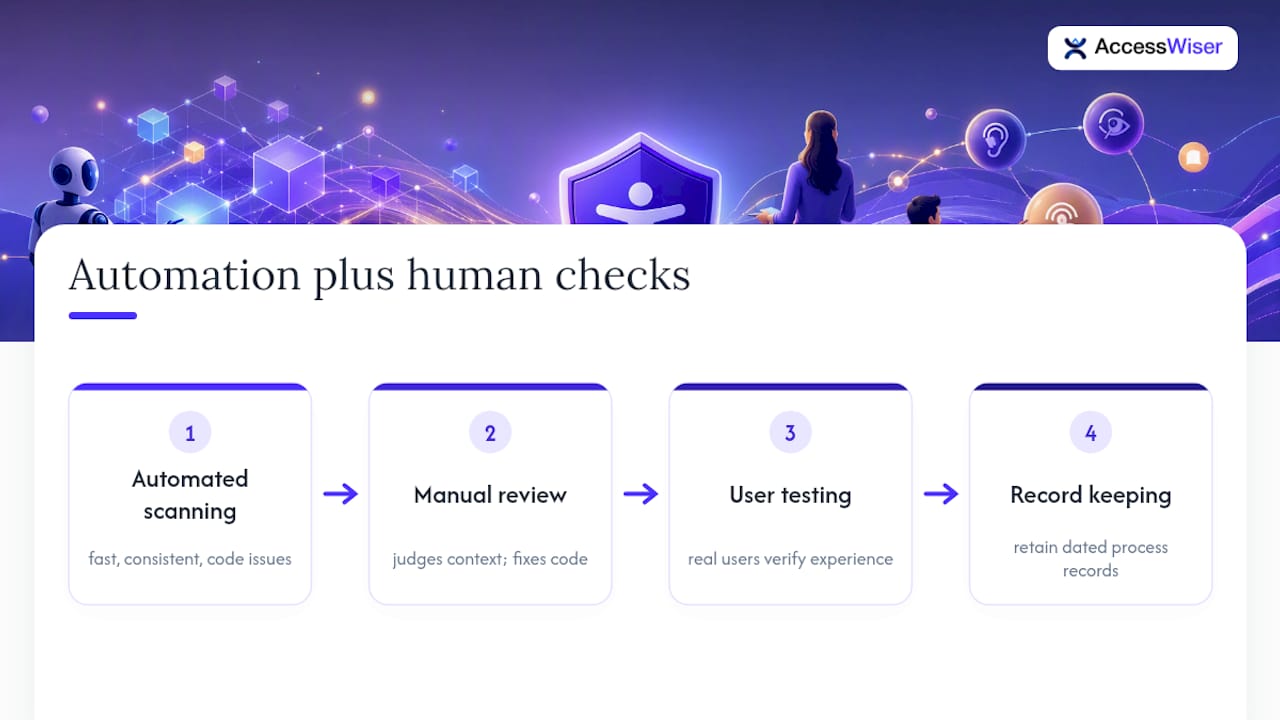
Automated scanning earns its place in any serious accessibility program. It’s fast, it’s consistent, and it catches a wide swath of code-level issues, missing alt attributes, insufficient contrast, unlabeled form fields, at a scale no manual reviewer could match on a large site. What it consistently misses is context. A scanner can confirm an image has alt text; it can’t judge whether that alt text actually communicates what the image means to someone who can’t see it.
That’s why the strongest programs pair automated discovery with manual code review and real user testing, then keep dated records of the whole process. Courts and compliance officers don’t reward a single clean scan report. They look for a pattern: issues found, issues fixed in the underlying code rather than patched at runtime, and a schedule that catches new problems before they become old ones. Small teams without a dedicated accessibility staff shouldn’t try to fix everything at once. Prioritize the AA criteria most likely to trigger a complaint, contrast, captions, keyboard access, then work down the list incrementally rather than freezing on the size of the whole project.
— Admin
Putting a Compliance Roadmap Into Practice With AccessWiser
Running that roadmap by hand, page by page, is exactly where most teams stall. AccessWiser was built to carry the technical weight of it: automated scans map every issue it finds directly to the WCAG 2.2 AA success criterion it violates, with Section 508 and EN 301 549 mappings included, so you’re not left guessing which rule a flagged element actually breaks. Every finding comes with plain-language guidance for fixing the code itself rather than papering over it with a runtime patch, which lines up with the code-level remediation this article recommends over overlay-only fixes.
Beyond the initial scan, AccessWiser runs scheduled re-checks that catch regressions when a new page or feature quietly reintroduces an old barrier, and it keeps dated records of scans and fixes so you can generate an accessibility statement backed by an actual paper trail. If you’re ready to see where your own site stands against WCAG AA, start with AccessWiser’s accessibility solutions and run your first scan today.
Where to Verify These Standards Yourself
Primary sources beat secondhand summaries when the stakes involve legal risk. The DOJ’s web accessibility rule fact sheet lays out Title II obligations directly. The W3C’s WCAG FAQ clarifies what conformance actually requires. Section508 offers federal implementation tools, and the ABA’s analysis of Title III tracks how courts are currently applying WCAG to private businesses.
Sources
Recommended
Articles on this blog are general information about web accessibility, not legal advice. Laws change and their application depends on your specific situation — for decisions with legal consequences, consult a qualified legal professional.
Articles on this blog are general information about web accessibility, not legal advice. Laws change and their application depends on your specific situation — for decisions with legal consequences, consult a qualified legal professional.