Blog · 8 min read
Stop Procurement Delays: Accessibility Monitoring With Baseline Audits

Continuous accessibility monitoring is scheduled, automated scanning that checks a live website against WCAG 2.2 rules on an ongoing basis, catching regressions between full audits. It never replaces a manual audit. The correct sequence is audit first, monitoring second, and periodic re-audit after that. Teams with frequent deploys, growing sites, or real legal exposure benefit most, and they benefit only once a known-good baseline exists.
TL;DR:
- Automated monitoring should only be activated after completing a manual audit and establishing a clean baseline, to avoid drowning in unresolved issues.
- Scan frequency should align with how often the site changes, such as daily for high-traffic or frequently updated sites, and manual re-audits are essential after redesigns or major updates.
- Monitoring tools must provide detailed evidence, including timestamps, diffs, and verification records, to support compliance documentation and legal reviews.
- Automated scans excel at catching pattern-based errors but require manual testing for contextual and dynamic accessibility issues, emphasizing the need for combined approaches.
- Building an effective program involves integrating checks into existing workflows, setting clear SLAs, and assigning ownership across teams to ensure ongoing accessibility maintenance.
Table of Contents
- How Accessibility Monitoring Works: Crawling, Rules, and Scan Cadence
- What Accessibility Monitoring Catches (and What It Misses)
- When to Start Monitoring and How Often to Scan
- Building an Accessibility Monitoring Program: SLAs, CI/CD, and Ownership
- Choosing an Accessibility Monitoring Tool: What to Check For
- Documenting Accessibility Monitoring Evidence for Compliance
- Our Take: Monitoring Is Maintenance, Not a Substitute
- Put Continuous Accessibility Monitoring to Work
- Sources
How Accessibility Monitoring Works: Crawling, Rules, and Scan Cadence
A monitoring platform crawls a site on a schedule, then checks what it finds against a ruleset built from WCAG 2.2. Most tools do not crawl every single page every time. Instead, they sample templates, since a product listing page and a blog post usually share the same header, footer, and navigation code, and checking every template catches most structural issues without wasting scan cycles on near-duplicate pages.
Scans typically run on one of three triggers:
- A fixed schedule, such as daily or weekly, for stable sites with low change velocity
- A per-deploy trigger, tied to a release pipeline, for sites shipping code frequently
- An event trigger, fired when a specific component or template changes
Good platforms also run diff logic, flagging only what changed since the last scan instead of re-reporting the same 200 issues every week. Each finding should point to a specific DOM path or element, often with a screenshot, so a developer can locate and fix the actual code rather than guessing which button or field triggered the flag.
What Accessibility Monitoring Catches (and What It Misses)
Automated scans are excellent at pattern matching. They reliably catch missing alt text, insufficient color contrast, unlabeled form fields, and heading structures that skip levels or duplicate an h1.
They get shakier with anything that requires judgment. ARIA attributes can be present and still misused, and a scanner often cannot tell the difference between an aria-label that’s technically valid and one that’s actively misleading. Dynamic behavior, like a modal that traps focus incorrectly or a carousel that shifts content unexpectedly, is also hit or miss depending on how the widget is built.
Here’s what still requires a person:
- Whether screen reader output actually makes sense in context
- Whether written content is clear and meaningful, not just technically tagged
- Keyboard navigation order through complex, multi-step widgets
The gap matters more than most teams assume. Automated scans catch a moderate share of accessibility failures, typically under half, which means the majority of real barriers surface only through manual testing with assistive technology. Monitoring is a maintenance layer on top of that manual work, not a substitute for it.
When to Start Monitoring and How Often to Scan
Monitoring only works once you have a known-good baseline. Turn it on before that, and you’re just automating a backlog nobody asked for, drowning your team in issues a real audit would have already caught and prioritized. The sequence matters:
- Complete a comprehensive manual audit and remediate the findings first.
- Turn on monitoring to track regressions against that clean baseline.
- Schedule periodic manual re-audits, not just automated rescans, to catch what automation structurally cannot.
Cadence should track how fast your site actually changes, not a generic industry default:
- Per-deploy scans for teams shipping code weekly or more often
- Daily scans for high-traffic e-commerce or content sites with frequent editorial updates
- Weekly or monthly scans for smaller, low-change sites
Certain events should always trigger an extra manual review regardless of your normal cadence: a redesign, a new procurement review, a vendor or CMS migration, or a sudden spike in flagged regressions after a release.
Building an Accessibility Monitoring Program: SLAs, CI/CD, and Ownership
Monitoring without governance turns into a dashboard nobody acts on. Building a real program means wiring accessibility checks into the places your team already works, and assigning consequences when something breaks.
Start with integration. Run automated checks inside pull requests so obvious regressions get caught before merge, then run a full production scan after every deploy to catch what only shows up on the live site, including third-party scripts and CMS-injected content.
Next, set severity-based remediation SLAs. A critical barrier blocking checkout might get a 48-hour fix window; a minor contrast issue on a rarely visited page can wait two weeks. Crucially, require manual verification before closing any finding — a scanner saying “resolved” and a person confirming it’s actually usable are two different things.
Ownership needs to be explicit:
- Engineering owns the fix
- QA verifies it against the original finding
- Product prioritizes the backlog
- Compliance tracks documentation
- One executive sponsor breaks ties when priorities conflict
Track KPIs that show risk reduction, not just activity: remediation velocity, regression rate per release, new issues introduced per deploy, and backlog age for unresolved critical items.
Pro Tip: Track backlog age separately by severity. A five-day-old critical issue and a five-month-old minor one look identical on a raw count, but they represent completely different levels of risk.
Choosing an Accessibility Monitoring Tool: What to Check For
Before signing a contract, hold any monitoring platform to a specific checklist rather than a sales pitch. Vendor-agnostic evaluation criteria matter more than brand names here.
- WCAG 2.2 coverage with an explicit map of which success criteria are automated versus manual, not a vague “compliance” claim
- PDF and mobile or native app scanning, plus reliable handling of authenticated pages and single-page applications
- Audit handoff workflow that lets a manual tester or panel feed findings back into the same system as automated results
- Export formats that produce accessibility-statement-ready documentation, not just a dashboard screenshot
- Issue tracker and CI/CD integration, so findings route to the tools engineers already use
- Severity classification with template-level surfacing, screenshots, DOM paths, and plain-language remediation guidance for each finding
Federal contractors and agencies have an added reason to be strict here: Section 508 procurement standards increasingly expect exportable, dated evidence, not just a passing score.
Documenting Accessibility Monitoring Evidence for Compliance
A monitoring program that produces no paper trail is nearly as risky as having no program at all. Compliance officers, legal counsel, and procurement reviewers all ask for evidence in different formats, and the tool needs to generate it without a manual scramble.
Keep these records at minimum:
- Timestamped scan results, stored over time rather than overwritten
- Diffs showing what changed between scans
- Remediation verification records, including who confirmed the fix
- Verifier identity for every closed finding
Accessibility statements and VPAT/ACR documents benefit directly from this data. A statement that references specific scan dates and remediation history reads as far more credible to a reviewer than one built on general claims.
| Report type | Primary audience | Recommended cadence |
|---|---|---|
| Executive dashboard summary | Leadership, compliance officer | Monthly |
| Full scan and remediation log | Legal, procurement | Quarterly or per audit |
| Accessibility statement update | Public, regulators | After each re-audit |
Offline, exportable archives matter too. A procurement reviewer or opposing counsel rarely wants a login to your dashboard. They want a file.
Our Take: Monitoring Is Maintenance, Not a Substitute
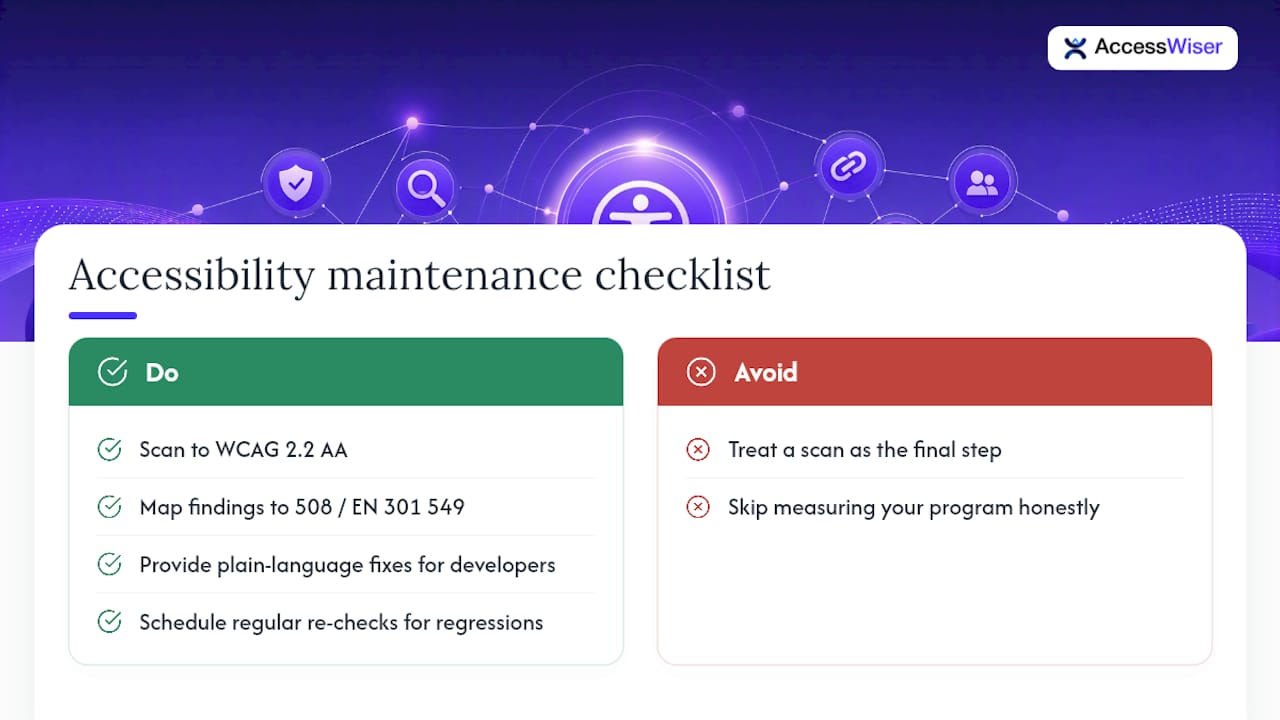
Accessibility work only sticks when it’s treated as maintenance, not a one-time project. That means scanning against WCAG 2.2 AA success criteria, with Section 508 and EN 301 549 mappings built in, so every finding ties to a specific element and a specific rule. It means plain-language remediation guidance written for a developer’s actual codebase, scheduled re-checks that catch regressions after launch, an optional widget for visitors who need adjusted contrast or reading support, and dated records of every scan and fix.
None of that replaces a manual audit. It documents the maintenance layer around one. Measure your own program against the checklist above, honestly, before assuming a scan result means you’re done.
— Admin
Put Continuous Accessibility Monitoring to Work
Everything covered above, the WCAG 2.2 mapping, the scan cadence, the remediation SLAs, the exportable evidence, is what AccessWiser was built to operationalize rather than just describe. Instead of stitching together a scanner, a spreadsheet for tracking fixes, and a separate process for generating an accessibility statement, AccessWiser runs the scan, hands you plain-language fix guidance tied to the exact element and criterion, reschedules re-checks automatically, and keeps dated records you can hand to a compliance officer or procurement reviewer without extra formatting. If you’re responsible for keeping a site compliant instead of just auditing it once and hoping it holds, start a trial and see how AccessWiser’s accessibility solutions fit into the program you already have.
Sources
Recommended
Articles on this blog are general information about web accessibility, not legal advice. Laws change and their application depends on your specific situation — for decisions with legal consequences, consult a qualified legal professional.
Articles on this blog are general information about web accessibility, not legal advice. Laws change and their application depends on your specific situation — for decisions with legal consequences, consult a qualified legal professional.